TapPicker()
The user taps a spot on their own screen, then drags the marker to fine-tune it. The answer is a Point.
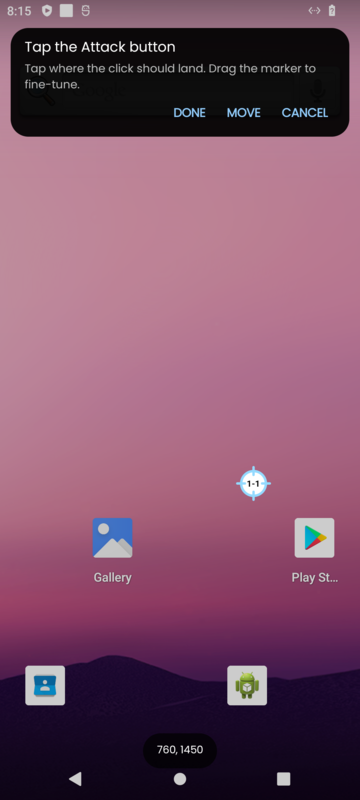
Constructor
TapPicker(id: number, text: string)
TapPicker(id: number, text: string, default: Point)
Parameters
| Parameters | Type | Description |
|---|---|---|
| id | number | The question's id, for Dialog:getValueById() |
| text | string | The instruction, such as "Tap the Attack button" |
| default | Point | Optional. Used until the user picks, so the macro works right away |
Example
Dialog:init()
Dialog:add(TapPicker(1, "Tap the Attack button"))
Dialog:showIfNeeded()
Screen:click(Dialog:getValueById(1), ClickParams())
Notes
- Without a default, the user must pick before OK.
setRequired(false)makes it optional; the answer is thenniluntil they pick. - The default is in your macro's coordinates and is scaled like your other points. A picked spot is already on the user's screen, so it is used as it is.
- If the user's screen size changes, the pick no longer fits and the dialog asks for it again.