Question Types
Every question is a block in the Dialog Components category, and a function in Lua. This page shows what each one looks like to the user and what your macro gets back.
text
A line of text for the user to read, such as a short instruction. It has no answer.
Lua: TextView(text)
checkbox
A box the user ticks. The answer is true when it is ticked.
Lua: CheckBox(id, text, defaultChecked)
text input
A field the user types in. The answer is the text, which can be empty.
Lua: EditText(id, hint, defaultText)
number input
A field that only takes a number. The answer is a number. Tick limit to keep it between two values; the user sees the range under the field, and OK waits for a number in it.
Lua: NumberInput(id, hint, default)
slider
The user slides to a number between from and to. The answer is a number. step makes the slider move in steps; 0 slides freely.
Lua: Slider(id, text, min, max, default)
options
Choices shown as round buttons; the user picks one. Put option blocks inside. The answer is the id of the chosen option, not its text.
Lua: RadioGroup(id, defaultOptionId) with RadioButton(id, text)
dropdown
The same as options, shown as a dropdown. Better for long lists. The answer is the id of the chosen option.
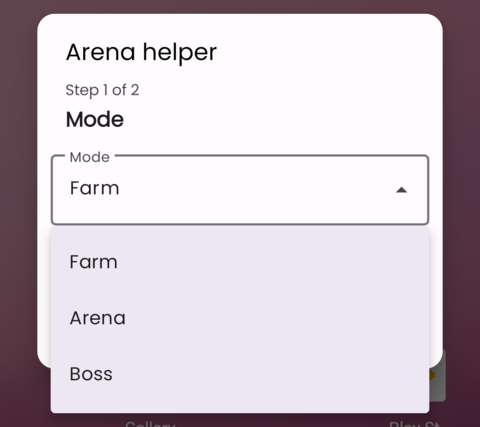
Lua: RadioGroup:showAsDropdown(label)
tap picker, tap list picker, touch recorder
The user shows the macro something on their own screen: one spot, several spots in order, or a whole routine. See Pick on the User's Screen.
Questions that must be answered
A question without an answer shows Not set yet in red, and OK waits until the user answers it. These must be answered:
- number input: it can't be left empty, and with limit the number must be in range
- tap picker and touch recorder without a default
- tap list picker
In Lua, setRequired(false) makes one of them optional.
Help under a question
In Lua, setHelp(text) adds a small line of help under any question, such as "Wait between actions".